 ColonyCat
Feeding logs
A feeding log is a short note you (or any volunteer) drop after a feeding run. It catches problems early: who fed, how many cats showed up, who's missing, anything weird. The whole entry takes thirty seconds.
These small daily entries are how you spot that Domino hasn't been to the feeder in three days, or that the bowl was empty when you arrived (someone forgot to feed the day before, or another colony nearby was raided).
What you're about to do
- Open the Feed page from the top nav, or click the button on a colony page.
- Pick the colony you just fed, type how many cats you saw, flag any that were missing.
- Save. The entry shows up in the colony's history and the dashboard's recent activity.
Step 1: Open the feeding form
You have two options.
From the Feed page: Click 🥣 Feed in the top nav. You land on a form titled Feeding log.
From a colony page: Open the colony, scroll down to Log a feeding, and click the button. A form pops up as a modal window, with the colony pre-filled.
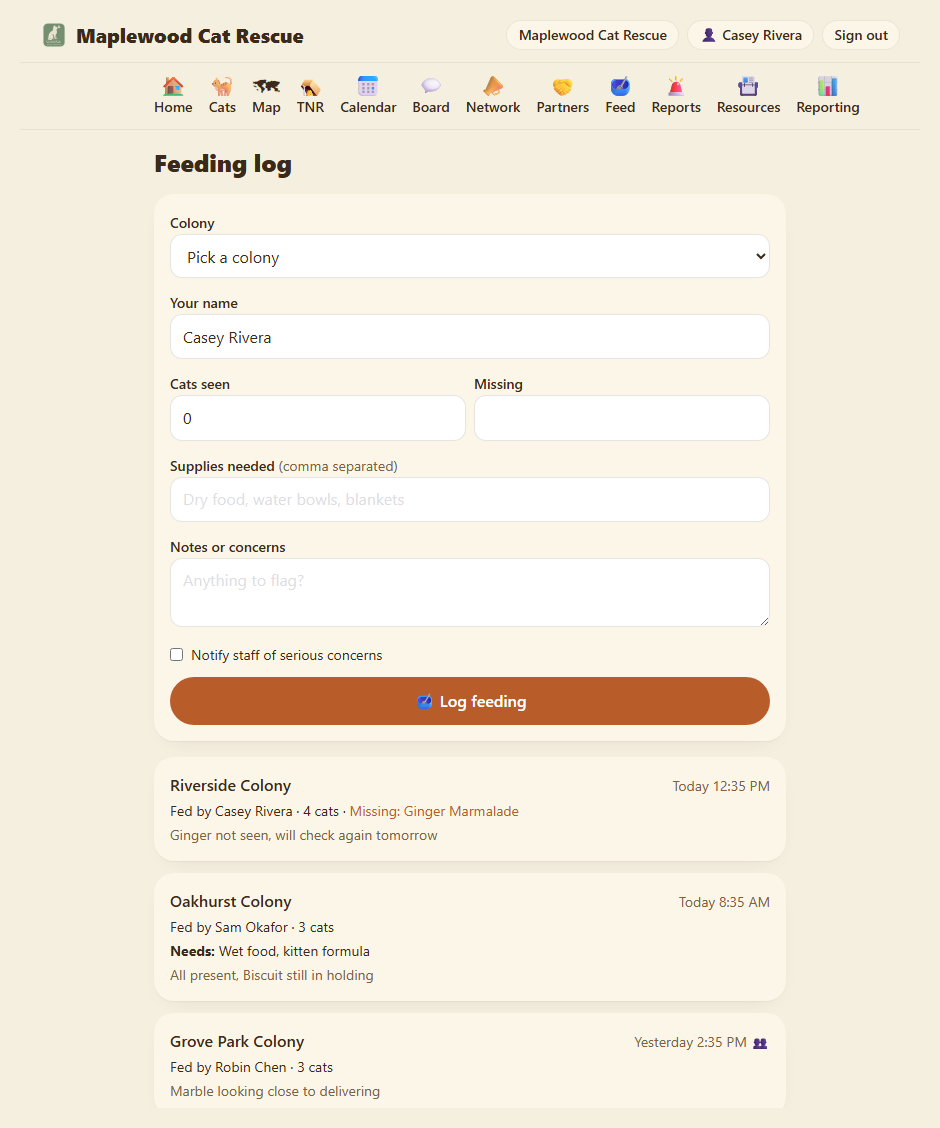
Colony. Pick which colony you just fed. If you only have one, it's pre-selected. (See the note about per-colony access below.)
Your name. Pre-filled with the name on your account. Change it if a different volunteer is using your login.
Cats seen. A number. Type how many cats came to eat. Estimate is fine.
Missing. Comma-separated notes about any cats you expected but didn't see. "Mochi, Pearl". Just jot what you saw, there's no list to match against.
Notes. Anything to flag. "Bowl was empty when I got there." "New black cat showed up, looks pregnant." "Trap on the south side has a broken latch."
Supplies needed (comma separated). Low on something? Jot it here, "dry food, traps", and it's added to this colony's 🧺 Supplies needed checklist (Chapter 2) so whoever does the shopping sees it. No need to tell anyone separately.
Notify staff of serious concerns. Tick this when the notes are something the coordinators should see now, not at the next log review. It flags the entry for your staff and admins.
Click 🥣 Log feeding.
Step 2: Look at the colony's history
You bounce back to the colony page. Scroll down to Recent feedings here and you see your entry, plus any earlier ones from other volunteers.
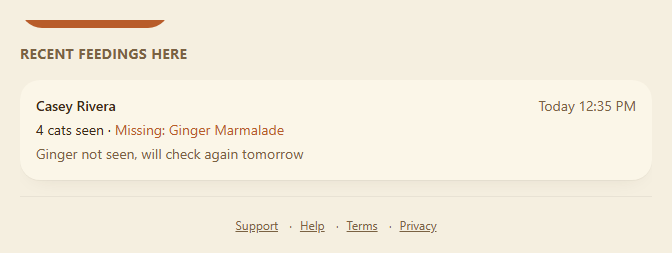
Each card shows who fed, when, how many they saw, and any notes that were missing. All of the information is right on the card, including supplies needed and any flag about concerns.
Step 3: Catch problems
The point of the log isn't to track feedings for their own sake. It's to spot patterns.
- A cat missing two feedings in a row. Worth driving by at an odd hour to look. Might be injured, might have wandered, might just be napping somewhere new.
- Empty bowls when you arrive. Means someone skipped, or someone else (raccoons? a neighbor?) cleaned them out. Talk to your team.
- Cat counts dropping over time. A colony of 12 dropping to 8 over three months without TNR activity probably means cats moved, died, or your trap-neuter-return is working. Either way, you want to know.
The dashboard's main page surfaces recent feedings near the top. That's so you can glance at it once a day and see what's been happening without having to click into each colony.
Step 4: Per-colony access (why your colony list is short)
If your org uses per-colony scoping (a way to limit volunteers to specific colonies), your colony dropdown on the Feed page might be shorter than the full list. You'll only see the colonies you're assigned to. If you try to log a feeding for a colony you don't have access to, you'll get an error: "That colony is not one of your assigned colonies." Ask an OrgAdmin to expand your access if you need it.
This doesn't affect the modal on the colony page: if you're already on a colony page, the form pre-fills that colony and submits correctly.
Step 5: A volunteer who doesn't have an account
ColonyCat is designed so people who feed colonies don't have to make accounts unless they want to. A neighbor who feeds when you're sick, a volunteer who's not yet a member, they can just tell you what they saw and you log it on their behalf.
Put their name in the Your name field instead of yours. The entry is still attributed to them. This is also how you give credit accurately when several people share a colony.
Where you are now
- You have one feeding logged.
- The colony's history shows it.
- Anyone in your rescue can see what's been happening at a glance.
In Chapter 6 we cover the Report page, fast intake for emergencies (sick cat, injured cat, new kittens) so they don't fall through the cracks.
A few sanity-savers
- Don't beat yourself up about feedings you forgot to log. A missed log doesn't break anything; the cats still got fed (presumably). Log the next one.
- The dashboard counts feedings across the whole rescue, not per colony. That's intentional, it tells you whether the rescue as a whole is paying attention, which is what you'd want a coordinator to notice.
- You can log a feeding from anywhere. Use the Feed page if you want to catch up on several colonies at once. Use the colony page button if you're already looking at a specific colony and want to log it right then.
- The notes field is a great place for "no big deal but…" mentions. New cat showed up, weather damaged the shelter, the neighbor said hi. Stuff that might matter later but isn't an emergency.
→ Next: Chapter 6: Emergency reports