 ColonyCat
Resources and clinics
Your group probably knows a handful of essential contacts: the vet clinic you use, the rescue that can take a cat you can't place, the spay/neuter program that runs cheaper surgeries, the food pantry, maybe a grant program that helps with vet costs. The Resources directory is where you keep that list handy in ColonyCat, organized by type and one tap away when you need it.
This chapter covers adding a resource, marking it as a clinic so it shows up when you schedule surgeries and appointments, and keeping your directory up to date.
What you're about to do
- Open 📇 Resources and see what your group has already added.
- Add a new resource (any org member can view; OrgAdmins and OrgStaff can create).
- Mark it as a clinic if it's a vet or spay/neuter clinic, so it shows up in your TNR and cat-care scheduling.
- Keep default hours for clinics, so your trap-night and appointment forms auto-fill drop-off and pick-up times.
Step 1: Open the Resources directory
Tap 📇 Resources in the navigation. You see all the resources your group has saved, grouped by type: Clinics, Rescues, Food pantries, Financial assistance, and so on.
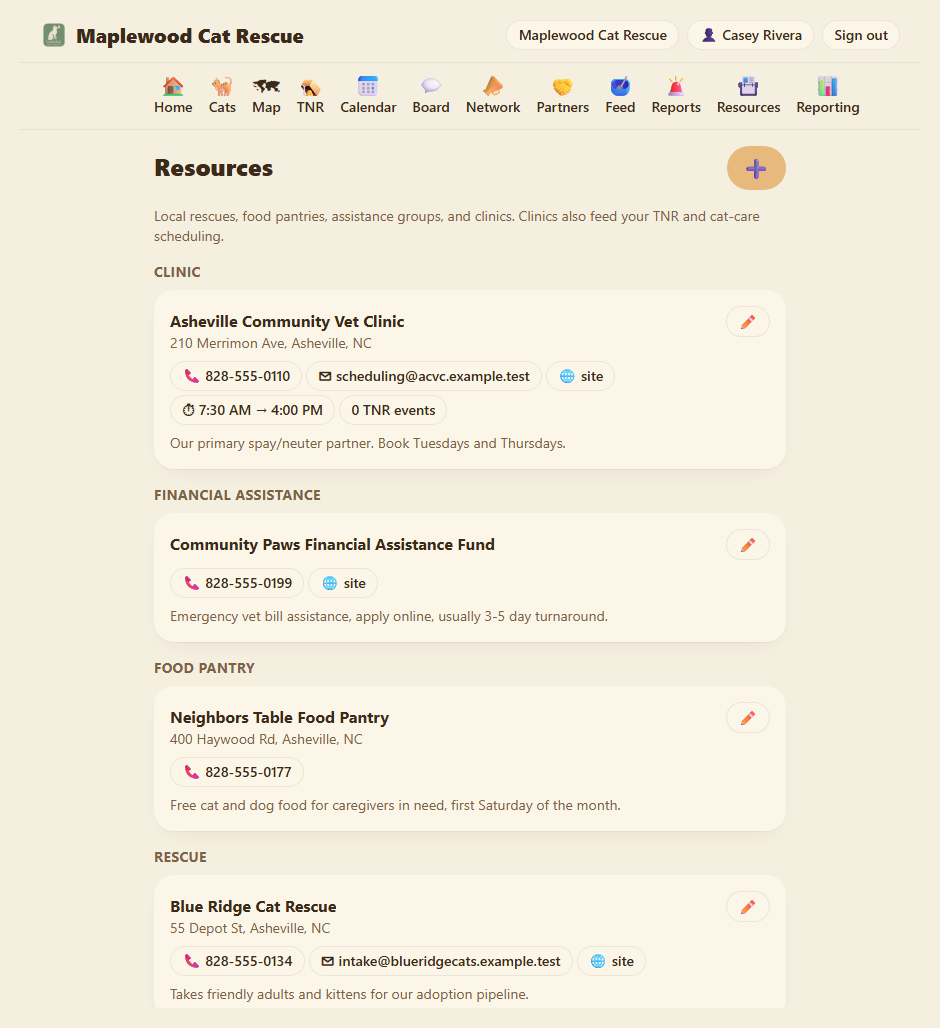
Every resource shows its name, address (if any), and contact links (phone calls, email, website). If it's a clinic, you also see its default drop-off and pick-up times and a count of how many TNR events you've scheduled there.
Any org member can open this page. Only OrgAdmins and OrgStaff can add, edit, or delete resources.
Step 2: Add a resource
At the top of the Resources page, tap the ➕ button. (If you don't see it, you need OrgAdmin or OrgStaff permission.)
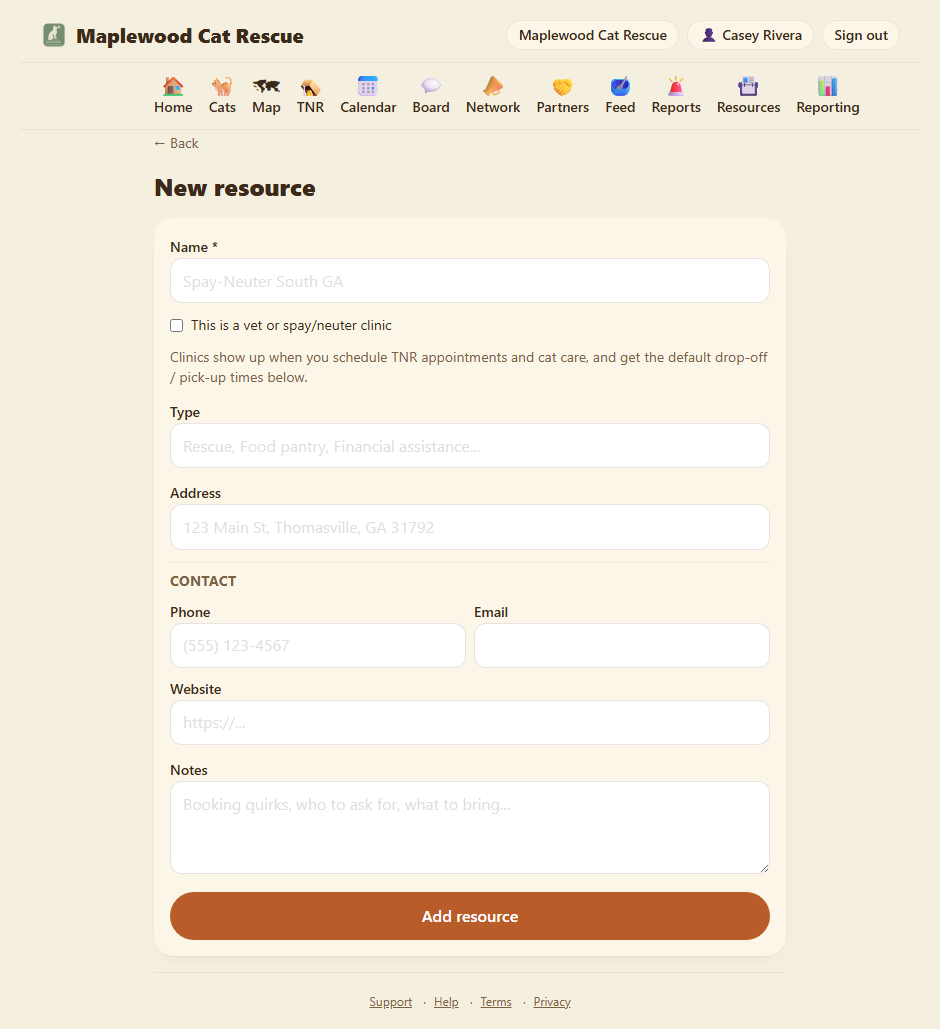
The form:
Name. What it is. "Spay-Neuter South GA", "Feline Rescue League", "Emergency Vet Clinic", etc.
Type. A category to help you find it later. ColonyCat suggests common ones: Clinic, Rescue, Food pantry, Financial assistance, Foster network, Spay/neuter voucher. You can pick one of those or type your own (e.g. "Vaccine clinic", "Microchip provider", "Grant fund").
This is a vet or spay/neuter clinic. Check this box if this resource is a clinic you use for TNR or cat care appointments. When you check it, the Type automatically locks to "Clinic". (You can type "Clinic" and it auto-checks the box.) This matters because clinics show up in three special places:
- The clinic picker when you plan a trap night under 🪤 TNR.
- The clinic picker when you log cat health care under Health and care notes.
- The calendar clinic picker when you add an appointment event.
So by marking a clinic here, it becomes available everywhere you need it.
Address. The street address (e.g. "123 Main St, Thomasville, GA 31792"). Optional.
Contact. Phone, email, and website. All optional. These turn into clickable links on the directory, so anyone viewing the list can call, email, or visit with one tap.
Default hours (clinics only). If you checked "This is a vet or spay/neuter clinic", you see fields for drop-off and pick-up times. If your clinic always opens at 7:30 AM and closes for pickups at 4:00 PM, enter "7:30 AM" and "4:00 PM" here. When you pick this clinic in the TNR or cat-care forms, these times auto-fill so you don't have to type them every time. Leave blank if hours vary or you prefer not to set defaults.
Notes. Internal notes for your team. "Ask for Dr. Sarah", "Bring their rabies cert", "They give discounts on bulk spays", or anything else that helps the next person use this clinic smoothly.
Tap Add resource. You're done.
Step 3: Edit or delete
To edit a resource later, open Resources, find the one you want, and tap the ✏️ pencil icon at the top right of its card. (OrgAdmins and OrgStaff only.)
To delete, edit the resource, scroll to the bottom, and look for a delete button. (Note: deleting a resource from the directory doesn't erase any trap nights, cat care logs, or events where you recorded that clinic's name. Those records keep their clinic string as it was at the time; they just won't link forward to the directory entry anymore.)
If you change a clinic's name (e.g. "Spay-Neuter South GA" becomes "Spay-Neuter South Georgia"), ColonyCat auto-updates past TNR events so your clinic counts and name-matched reports don't fragment.
How clinics flow into your workflows
Once a clinic is added and marked as "This is a vet or spay/neuter clinic", it flows into these other parts of the app:
TNR surgeries. When you add a catch or plan a surgery under 🪤 TNR, the clinic field shows a dropdown of saved clinics so you can pick one fast instead of typing. You can still type a new name if you want; clinics are a suggestion, not a requirement.
Cat care and health records. When you log a vet visit, vaccination, or other care under a cat's Health and care notes, the clinic field offers the same dropdown.
Calendar appointments. When you add a vet appointment or other event under 📅 Calendar, and you link it to a clinic from your directory, the default drop-off and pick-up times (if set) auto-fill for you.
This keeps your clinic info consistent across the app and saves you from re-typing the same details.
Where you are now
- You have a centralized directory of essential contacts and services.
- Clinics (marked as vet or spay/neuter) are one tap away in your TNR, cat care, and calendar workflows.
- Your team can add, edit, and update the directory on the fly.
A few sanity-savers
- Any member can see it, only OrgAdmins/OrgStaff can edit. This keeps the directory reliable without everyone changing it.
- Custom resource types are yours. If you want to add "Adoption partner", "Foster referral service", or "Behavioral rescue", type it in the Type field and it becomes available for future resources.
- Clinics are optional. If you'd rather not track which clinic you used, you can leave the field blank on a trap night or appointment. The clinic directory is a tool, not a requirement.
- Default hours save time on trap nights. If your go-to clinic always has the same drop-off and pickup times, set them once and let ColonyCat fill them in automatically.
→ Next: Chapter 16: The help network