 ColonyCat
Group partnerships
If another rescue works the next town over, you have probably felt the gap. Two groups set traps on the same colony. Someone re-traps a cat that is already fixed. Nobody finds out until an ear tip shows up. Partnerships close that gap: you link up with a group you trust, and the two of you see each other's colonies on the map. That is the whole feature. It is read only on both sides, both groups have to agree, and either side can end it at any time.
This chapter covers how sharing works (start here, the privacy rules matter), how to find and connect with a nearby group, and how to control exactly which colonies you share.
Read this first: what a partner can and cannot see
A partnership is narrow on purpose. When you are partnered with another group:
- They see your colonies as pins on their map, and you see theirs. That is the only place partner colonies appear.
- The pins are read only. A partner can never edit, delete, or add to your colonies.
- A partner sees a colony's rough location and name. They do not see your cat records, your notes, your feeding logs, your caretakers, or the exact street address. Colonies on a map, nothing else.
And three things are always true, no matter what:
- A colony you mark private is never shared. Not with a partner, not as a pin, not ever. Private always wins.
- Sharing only happens while a partnership is active. The moment either side ends it, the pins disappear on the next map load. There is no lag and no cleanup step.
- You can hold back individual colonies from a partner while sharing the rest (see the last section).
If you remember one thing: private colonies stay private, and you are always in control of the rest.
What you're about to do
- Open 🤝 Partners and see who is nearby.
- Turn yourself on so nearby groups can find you (optional).
- Send a partnership request, or accept one.
- Choose which colonies each partner can see.
Step 1: Open the Partners page
Tap 🤝 Partners in the navigation. The page has three parts:
- Active partners, the groups you are currently sharing with.
- Requests, any partnership you have been asked to join or are waiting to hear back on.
- Groups near you, nearby rescues that are open to partnering.
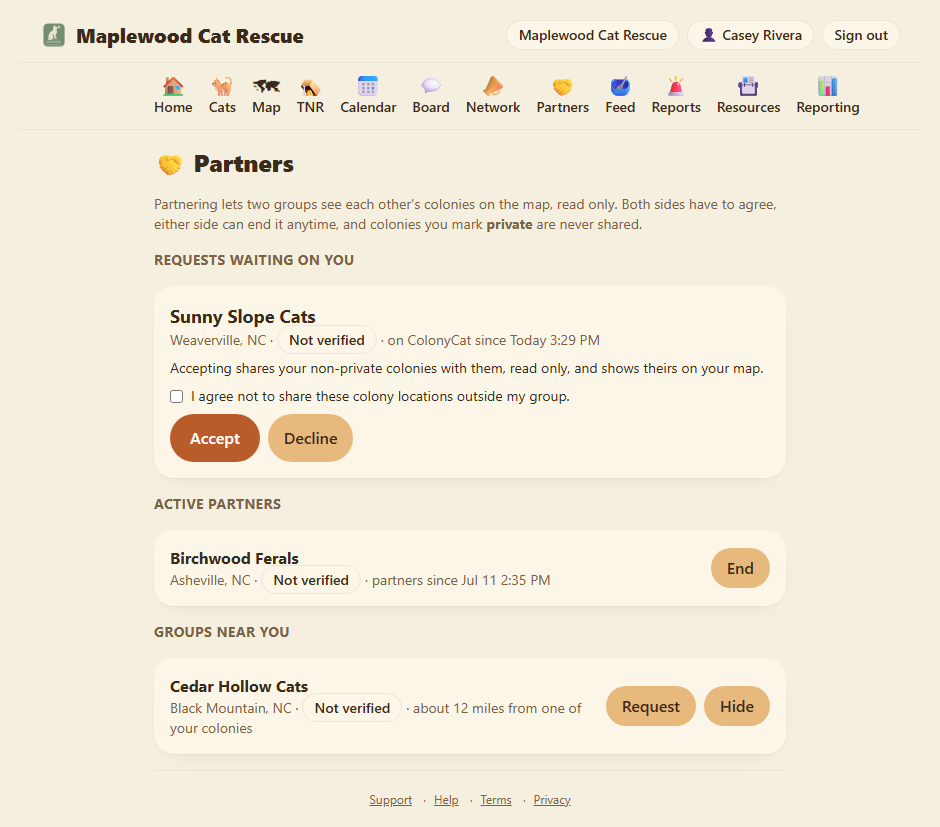
If everything is empty, that is normal for a new account. Groups only show up here once they choose to be findable, which is the next step.
Step 2: Let nearby groups find you
Being discoverable is opt in, and it is off by default. Until you turn it on, no other group can find you here, and you will not appear in anyone's "groups near you" list.
To become findable, open your organization profile (Edit profile) and turn on Open to partnership requests. Once it is on, any group within about 25 miles of one of your colonies can see your group's name and general area on their Partners page and send you a request. Turning it back off makes you invisible again. It is your call, and you can change it whenever you like.
Being findable is not the same as sharing. The toggle only lets other groups discover you and ask. It grants no access to anything on its own. Nobody sees a single colony until a partnership is requested, accepted, and active.
You only appear to groups that are genuinely nearby, and only your name and general area are shown, the same details already on your public page at yourgroup.colonycat.org. We never reveal anything about a group that has not turned this on.
Step 3: Connect with a group
To send a request: find the group under Groups near you and tap Request partnership. They get an email and see your request on their own Partners page. Nothing is shared yet.
To answer a request: a group that asked to partner with you shows up under Requests. Tap Accept to start the partnership, or Decline if it is not a fit. When you accept, you agree to a short partnership understanding: partners see each other's non-private colonies on the map, read only, and either side can end it anytime.
Once one side accepts, you are partners, and each group's shared colonies appear on the other's map right away.
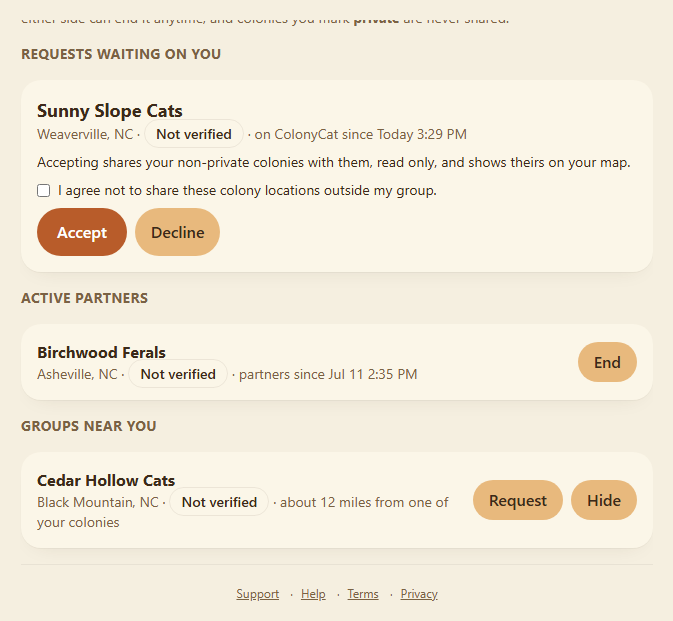
Not interested in a suggestion? If a nearby group keeps showing up and you would rather it did not, tap Hide on their card. That is private to you, the other group is never told, and you can bring it back later from the Show hidden list on the Partners page. Hiding is just for tidying your own view. It is not a block and it does not affect them.
Only OrgAdmins can send, accept, decline, or end partnerships. Your other members can see partner colonies on the map, but the connections themselves are an admin decision.
Step 4: Choose which colonies you share
By default, when you partner with a group, all of your mapped colonies are shared with them (except any you have marked private, which are never shared). Most of the time that is exactly what you want. But you can withhold specific colonies from specific partners.
Open a colony and look for the Shared with section. It lists your active partners with a checkbox each. Leave a partner ticked to share this colony with them, untick to hold it back. Everything is shared until you untick it.
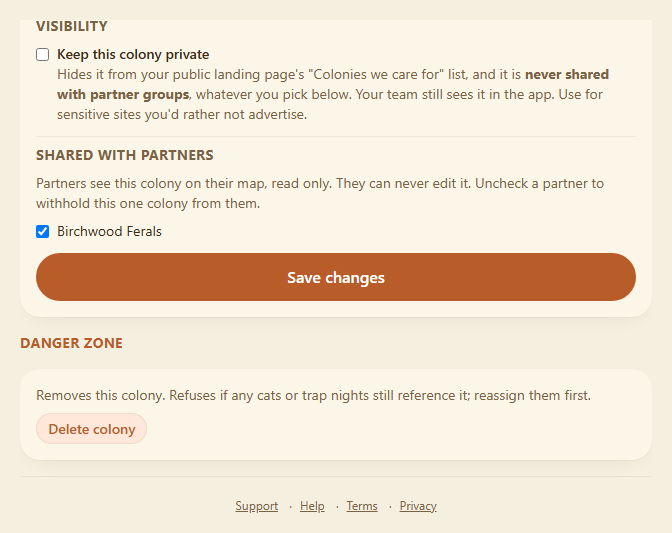
This is per colony and per partner, so you can share your main working colonies with a neighbor while keeping a sensitive relocation site to yourself, without marking it fully private.
Two ways to keep a colony to yourself. Mark it private to hide it from everyone: your public page and every partner, permanently, in one switch. Or leave it public but untick a partner under Shared with to hide it from just that group. Private is the big hammer, Shared with is the fine adjustment.
Ending a partnership
Either side can end a partnership at any time, from the Active partners list, no reason needed. The moment it ends, the shared pins vanish from both maps. Rescues drift in and out of working together, and reconnecting later is completely normal, so a group you have parted ways with can show up again under "groups near you" down the road.
Where you are now
- You can see a trusted nearby group's colonies on your map, and they can see yours, read only.
- You decide whether you are findable, who you partner with, and which colonies each partner sees.
- Private colonies never leave your group, and ending a partnership takes effect instantly.
A few sanity-savers
- Private beats everything. A private colony is never shared with a partner, whatever else you have set.
- Read only, always. A partner can look at your colonies on the map. They can never change them or open your cat and feeding records.
- You have to be asked, or ask. There is no automatic sharing. A partnership only exists after a request and an acceptance.
- Findable is opt in. You will not appear to anyone until you turn on "Open to partnership requests," and you can turn it off again anytime.
- Free on every plan. Partnerships are available whether you are on the free plan or a paid one.
- OrgAdmins run the connections. Any member can see partner pins on the map, but only admins send, accept, or end partnerships.
→ All chapters: Contents